
Table of contents
- What is a POS integration?
- The 6 POS integrations that matter most
- How a POS integration actually works
- Which POS systems does Otter integrate with?
- Which integrations to set up first
- Start with the integration that removes the most manual work
- Frequently asked questions about POS integrations for restaurants
A POS system is the central command center for your restaurant, taking on various tasks like accepting orders, monitoring payments, managing inventory, and creating reports. Choosing the right restaurant POS system is critical to success in a business that now runs across dine-in, takeout and delivery at the same time.
But the grind never ends in the restaurant business. Even after buying the fundamental POS hardware and software, it is worth thinking about integrating additional solutions to improve how your business operates.
What is a POS integration?
A third-party POS integration is a solution designed to connect your current restaurant POS system with another piece of software in your restaurant's tech stack. This means extending the power and core functionality of your system to do more with more.
Integrations empower your POS to gather and exchange data through links with other systems. By integrating other software with your POS, you essentially create a comprehensive restaurant management system that oversees all aspects of your business from a single location.
In this post we will explore the essential POS integrations that every restaurant owner should consider today. Once you have a handle on the fundamental integrations and their benefits, you can decide which solutions fit your restaurant's needs.
The 6 POS integrations that matter most
Delivery app integrations
Integrating your POS system with online ordering platforms and delivery services, such as Uber Eats, Grubhub, and DoorDash, helps your restaurant effectively manage and optimize takeout and delivery orders directly from one POS system. That way, you can tap into the growing demand for convenient food delivery, expand your customer base, and increase overall revenue. Already ahead of delivery? The next step is picking the right multichannel restaurant ordering system to tie every channel together.
If you are doing it without an order aggregator, you may be manually accepting orders from each of the delivery services' individual tablets. To simplify your operations, consider adding an order aggregator to make life easier for you and your staff.
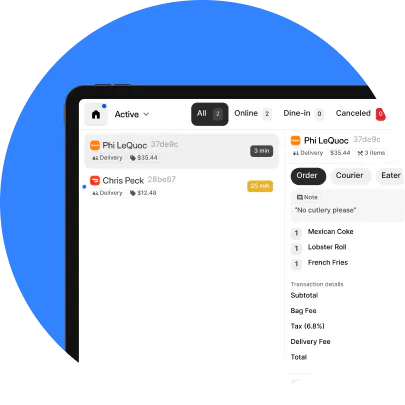
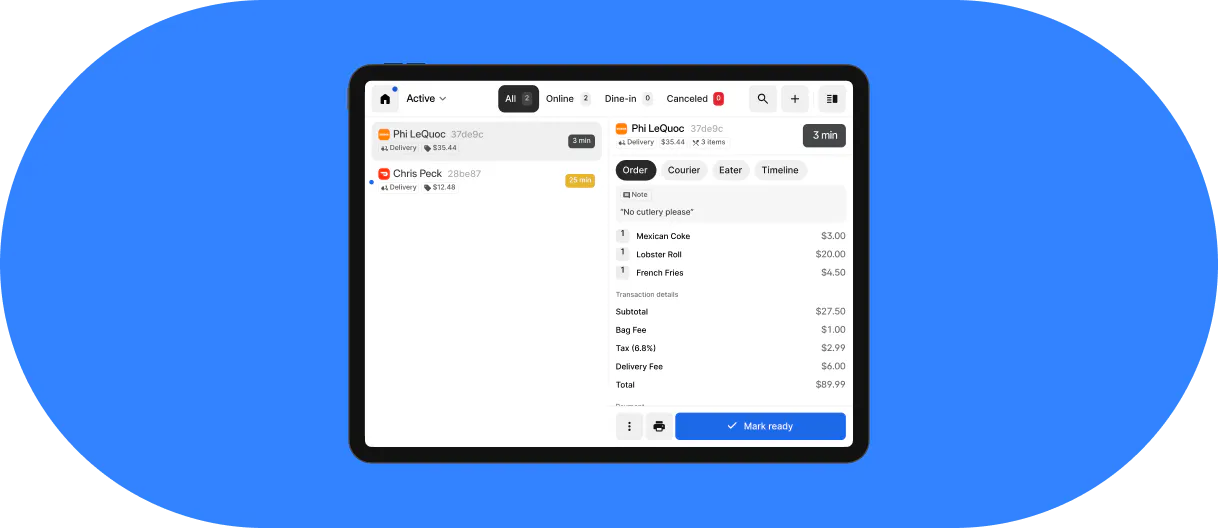
Otter's restaurant order management brings together orders from multiple delivery apps and centralizes them in one place that connects to your POS, sending every order straight to the kitchen. With restaurant pos integrations like these, you can manage all your online and offline orders together, reducing errors and streamlining the whole order fulfillment process.
Direct online ordering integrations
An increasing number of restaurant owners today prefer to receive orders directly from eaters rather than through third-party delivery apps like Uber Eats and DoorDash. This comes from the motivation to better support customers, while saving on costly commission fees.
This is where direct ordering integrations, such as Otter's Online Ordering, come in. With direct online ordering, customers can place orders through your restaurant's website or app, bypassing the need for third-party platforms. This reduces costs for both the restaurant and the customer by eliminating commission fees, and it builds a more direct relationship with your guests. For a look at how kiosks, QR codes and multi-channel online ordering fit together, see our rundown of ordering options.
Accounting and bookkeeping
Bookkeeping can be a crunch, in a not so delicious way. Integrating accounting software with your POS streamlines financial record-keeping, reduces manual data entry, and minimizes errors. Accurate sales, expense, and tax tracking is also vital when it comes to making decisions for your restaurant, not to mention making sure you are complying with local financial regulations.
Otter Financials syncs directly with your restaurant POS to give you one view of cash flow, expenses, adjustments, delivery app payouts and promotional spending. Armed with these data points, operators can make better decisions about where the money is actually going. Otter also connects with accounting and back-office platforms including Restaurant365.
Menu management
Nothing makes a first impression like a well-designed menu with mouthwatering images and descriptions. Integrating a menu management solution into your POS system opens the door for you to update your menu easily across channels. This helps your restaurant menus remain dynamic, appealing, and responsive to market trends, customer preferences, pricing changes, and inventory.
Pair that with order management in the same system, and every channel stays in sync from menu to fulfillment.
Otter's Menu Management tool allows restaurant owners to make menu updates, 86 items, change prices, and more for any brand or location straight from their POS. The convenience of these features shaves time off the tedious task of menu updates, letting you focus instead on what you actually want to be doing: making good food and keeping customers happy.

Analytics and reporting
It has become increasingly difficult for restaurants to find a single source of truth for their performance data, especially now that most are balancing a busy dine-in, takeout, and delivery business. With that data spread across systems, you could be missing operational fixes that would increase orders and revenue. Analysing it by hand works in theory, but it is time-consuming and it invites errors. Getting lost in spreadsheets is probably the last thing you want to be doing.
Integrating a complete analytics solution straight into your restaurant POS system can uncover hidden challenges and new opportunities. With data that actually makes sense across your restaurant metrics, you have a much better chance of increasing profitability.
Otter Analytics is a restaurant analytics tool that integrates directly with your POS system and is built to help owners make decisions from real numbers. It provides a complete picture of sales, operations, finances, and marketing performance by hour, day, location, and more. With clear dashboards, you can identify performance patterns and cut down on issues like refunds and order errors.
Inventory and labor
The two integrations most operators set up last are the ones that quietly pay for themselves. Connecting inventory software to your POS means every sale draws down stock counts automatically, so you find out you are low on an item before a guest orders it. Connecting scheduling and timekeeping software means labor hours sit next to sales in the same place, which is the only way to see whether Friday night was actually profitable or just busy.
Otter connects with inventory tools including MarketMan and Restaurant365, and with scheduling and timekeeping tools including 7shifts, Homebase, When I Work and Deputy.
How a POS integration actually works
Most operators are told what an integration does without being told what happens. The sequence is short.
First, the integration reads the menu that already lives in your POS and publishes it out to your delivery channels, so you are not maintaining the same menu in four places. Second, orders keep arriving on the apps exactly as before, with nothing changing for the customer. Third, those orders are pushed into your POS as though someone had rung them in by hand, so they print in the back of house and appear on the kitchen screen alongside your dine-in tickets. Fourth, because every order now lands in one system, your reporting covers all of it instead of only the walk-in half.
The practical result is that nobody retypes an order. That is the whole value, and it is worth being plain about it: the time saved is the time your staff currently spends copying an order off a tablet into a till while a queue builds.

Which POS systems does Otter integrate with?
Otter connects with more than twenty point-of-sale systems, including Toast, Square, Clover, Lightspeed, Revel, Lavu, Epos Now, Shift4, Micros, Brink, Maitre'D, Squirrel Systems, POSitouch, GoTab, Focus, Veloce and Loyverse. Alongside those it connects with delivery and ordering platforms, couriers, inventory tools, scheduling software, gift card providers and payment processors, which covers most of the tech stack a restaurant is already running. The current list, broken down by category, is on Otter's integrations page.
If your POS is not on that list, it is worth asking rather than assuming the answer is no. Coverage changes, and for systems without a direct connection there is usually still a route in through an order aggregator that sits alongside the POS rather than inside it.
Which integrations to set up first
You do not need all six at once, and setting them up in the wrong order wastes the effort. A reasonable sequence for most restaurants:
- Start with the delivery app connection if you are doing any real delivery volume. It is the only integration on this list that gives staff time back during service rather than after it, which means the whole team feels the difference in the first week.
- Do accounting second. It saves the owner's own hours rather than the team's, and it compounds, because a month of clean data is worth more than a month of receipts in a drawer.
- Menu management matters most once you are running more than one channel or more than one location, because that is the point where keeping menus in sync by hand starts costing real money in wrong prices and unavailable items.
- Analytics is worth connecting early and judging later. It needs a few months of data in one place before the patterns mean anything, so set it up before you need it.
- Inventory and labor come last for most operators, and that is fine. They are the ones you add when the obvious fires are out and you are looking for margin rather than time.
As operations get more complex, a flexible POS matters more. Otter POS connects across online ordering, accounting, menu management, direct orders, analytics and reporting, so if you are comparing restaurant POS systems to upgrade your tech stack, it is worth looking at what each one connects to rather than only what it does on its own.
Start with the integration that removes the most manual work
Integrations are easy to overthink and easy to over-buy. The useful test is not how many connections a platform advertises, it is whether the one you set up this month stops someone on your team retyping orders. Pick that one, get it working properly, and add the next when the first has actually changed how a service runs.
If most of your order volume is arriving on delivery apps and going into your POS by hand, that is the place to start. Book a demo with Otter to see how the connection works with the POS you already have.
Frequently asked questions about POS integrations for restaurants
How do POS systems integrate with accounting software for restaurants?
The integration passes sales data from your POS into your accounting software on a schedule, so daily takings, tax collected, discounts and delivery app payouts arrive as records instead of as a shoebox of exports. What it removes is manual entry, which is where most bookkeeping errors in a restaurant start. What it does not remove is judgment: you still decide how things are categorised, and you still want an accountant looking at the result.
Which POS systems does Otter integrate with?
More than twenty, including Toast, Square, Clover, Lightspeed, Revel, Lavu, Epos Now, Shift4, Micros, Brink, Maitre'D, Squirrel Systems and POSitouch, with the full list by category on Otter's integrations page. If your POS is not listed, ask before you assume the answer is no, because coverage changes and there is often a route in through an aggregator that runs alongside your POS rather than replacing it.
How do I connect my POS to delivery apps like Uber Eats and DoorDash?
You connect them through an integration rather than app by app. Once the connection is live, your menu publishes out to each app from your POS, orders come back in automatically, and they print and appear on the kitchen screen with your other tickets. Setup is a matter of authorising each app and checking that your menu, prices and hours match what you want customers to see. The part worth testing before a busy service is what happens when you 86 an item, because that is where mismatches show up first.
How do I integrate an existing POS with new restaurant software?
Start by checking whether the new software has a listed integration with your specific POS, because that decides whether this is a configuration job or a project. If it does, setup is usually authorising the connection and mapping your menu items once. If it does not, the realistic options are an aggregator that sits alongside your POS, a middleware connector, or accepting manual entry for that one channel. Ask any vendor how the integration handles menu changes and refunds, since those are the two places a connection that looked fine on day one starts causing work.
Which POS integrations should a restaurant set up first?
Set up the one that removes the most retyping. For almost every restaurant doing delivery volume that is the delivery app connection, because it is the only integration that gives staff time back during service rather than after it. Accounting comes next, since it saves the owner's own hours. Menu management matters most once you are running more than one location or more than one channel. Analytics is worth having early but pays off later, when there is enough data in one place to see a pattern.
How does POS integration make online order management easier?
It reduces the number of screens someone has to watch from several to one. Without an integration, each delivery app has its own tablet, each has to be accepted separately, and each order is retyped into the POS, which is how tickets get missed on a busy Friday. With one, every order arrives in the same queue as your dine-in tickets, goes to the kitchen the same way, and lands in the same reporting. The measurable effects are fewer missed orders, fewer wrong ones, and sales figures that describe the whole business rather than part of it.

See how Otter connects to your POS